|
Underwriter Setup |
  
|
|
Underwriter Setup |
|
Getting There
Underwriter Setup can be accessed from the Main menu. Select => Maintenance | Underwriters Setup
Description
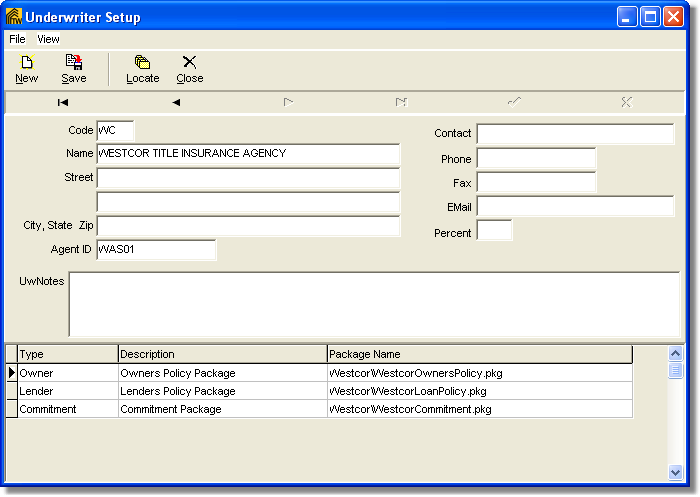
The Underwriter Setup dialog box may be accessed by selecting "Underwriters Setup" from the Maintenance menu. The Underwriter Setup allows you to enter information about your Underwriters that Turbo Title for Windows can use in documents, policies, and other forms where it is needed. Specifying a document package and a type as well as giving it a description will tell Turbo Policy which documents to use/print when that particular underwriter is selected. A list of all Underwriters entered into the system can be obtained by printing the Underwriter List.
NOTE:
| • | To changed existing and/or saved information you must first click the Edit button. |
| • | Underwriter codes can contain letters and numbers, however, each underwriter code needs to be unique from all others. If a non-unique code is entered, you will encounter an 7057 error. |
To Setup a New Underwriter
1. Choose Underwriters Setup from the Maintenance Menu.
2. Select New from the Underwriter Setup dialog box.
3. Enter an underwriter Code to identify the underwriter.
4. Enter any other necessary information to help identify the underwriter.
5. Click the Save button to save all changes.
To Add a New Document Package to the Underwriters Setup
1. Choose Customer Setup from the Maintenance Menu.
2. Select the underwriter you wish to add a new package to by using the navigation buttons (arrows.)
3. The list of packages is at the bottom of the screen. Click one of the three fields shown, type, description, and package name. Make sure you have clicked in a field in the LAST row of the package list. The field should be highlighted as shown below.
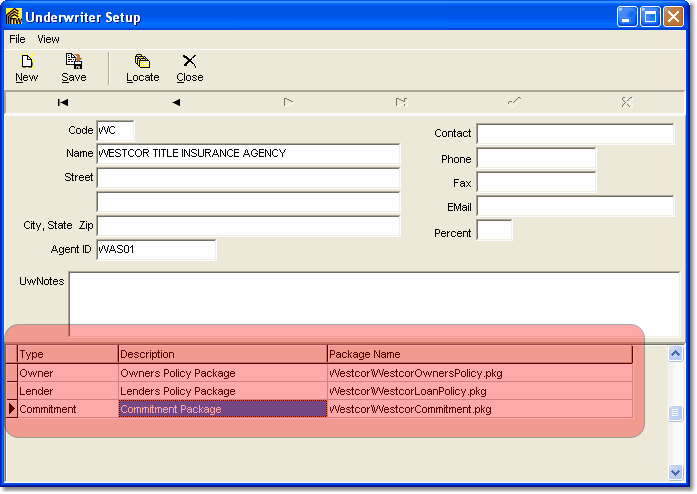
4. Press the down key on your keyboard, a new row will appear.
5. You can now use the drop down box to select the type of package, give it a description, and browse for the package you have created in the document packager.
6. Press the Save button to save all changes.
Underwriter Rate Schedule
Getting There
The Underwriter Rate Schedule can be accessed from the Underwriters Setup menu by selecting => View | Rate Schedule
Description
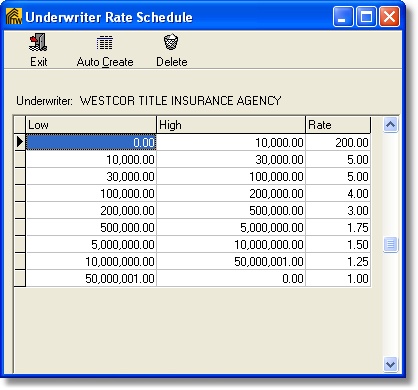
The Underwriter Rate Schedule is setup in the Underwriter Setup dialog box and is used by the Premium Calculator to help calculate premiums. Rate Schedules are setup for each individual underwriter. Clicking the "Auto Create" button will create a default rate schedule which can be customized to match your underwriter's rate schedule. The rate is a per $1000.00 rate.
To setup an Underwriter Rate Schedule
1. Select the underwriter that you wish to setup a rate schedule for in the Underwriters Setup.
2. From the underwriters setup menu select => View | Rate Schedule.
3. Click the Auto Create button at the top of the Underwriters Rate Schedule dialog box.
4. Click on any amounts that need to be changed and enter in the correct amount (including decimals)
5. Click the Exit button the leave the Underwriter Rate Schedule setup dialog box