|
Office Setup |
  
|
|
Office Setup |
|
Getting There
Office Setup can be accessed from the Main menu. Select => Maintenance | Office Setup
Description
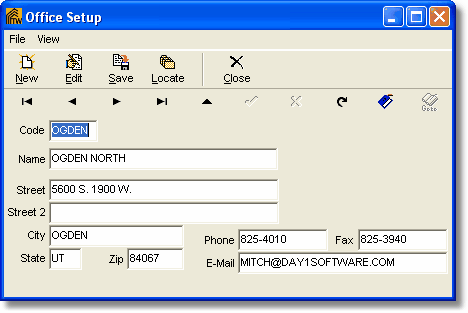
The Office Setup dialog box allows you to enter basic information about your office that Turbo Title for Windows will use when merging commitments, documents, templates etc. Office Setup information can also be used in filters and reports. This function is particularly useful if your offices are networked and share files and/or other Turbo Title for Windows information. A list of all offices entered into the system can be obtained by printing the Office List.
NOTE
| • | To changed existing and/or saved information you must first click the Edit button. |
| • | Office codes can contain letters and numbers, however, each office code needs to be unique from all others. If a non-unique code is entered, you will encounter an 7057 error. |
To Setup a New Office
1. Choose Office Setup from the Maintenance Menu.
2. Select New from the Office Setup dialog box.
3. Enter an office Code to identify the office.
4. Enter any other information desired to help identify the office.
5. Click the Save button to save all changes.