|
Reports |
  
|
|
Reports |
|
Getting There
Reports can be accessed from the main screen by selecting => Reports. For custom reports use the Ctrl+Alt+P shortcut.
Description
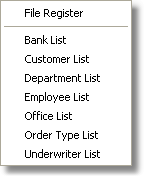
Selecting the Reports function from Turbo Title for Windows Main Menu will allow you to choose from a variety of reports. Among the list of standard reports you will find a File Register, Bank List, Customer List, Department List, Employee List, Office List, Order Type List, and Underwriter List.