|
Order Type Setup |
  
|
|
Order Type Setup |
|
Getting There
Order Type Setup can be accessed from the Main menu. Select => Maintenance | Order Type Setup
Description
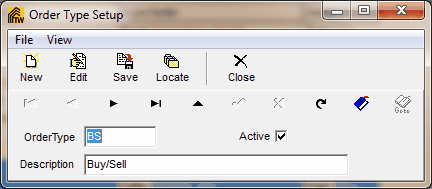
The Order Type Setup dialog box allows you to setup order types by adding or editing information. Order types can be assigned to files and can be used in filters, and reports. A list of all Order Types entered into the system can be obtained by printing the Order Type List.
NOTE
| • | To changed existing and/or saved information you must first click the Edit button. |
| • | The codes for Order Types can contain letters and numbers, however, each Order Type code needs to be unique from all others. If a non-unique code is entered, you will encounter an 7057 error. |
| • | The Active checkbox allows you to control whether or not you want it to be in use/effect. |
To Setup a New Order Type
1. Choose Order Type Setup from the Maintenance Menu.
2. Select New from the Order Type Setup dialog box.
3. Enter an Order Type Code to identify the Order Type.
4. Enter aa description (or name) for the Order Type.
5. Click the Save button to save all changes.