|
Setting Dates (Calendars) |
  
|
|
Setting Dates (Calendars) |
|
Getting There
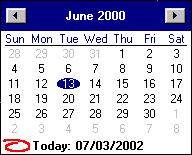
Selecting the drop down button next to any date field will show the Calendar.

Description
When setting the dates of orders etc. clicking the drop down button next to a date field will bring up a small calendar where from the user can select any desired date with the mouse. Clicking on a date will enter that specific date. If the year at the top of the calendar is clicked a list of years will appear from which the user can select a year. Clicking on the month will allow the user to select from a list of the months. Dates may also be entered by typing them in straight from the keyboard.