|
Copying Files |
  
|
|
Copying Files |
|
Getting There
Copy File is accessed from the Main menu. Select => File | Copy File.
Description
The Copy File function will allow you to copy information from one file to another.
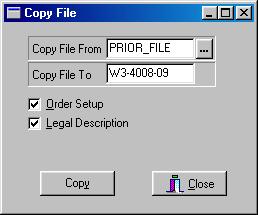
To Copy a File
1. Select Copy File from the File Menu.
2. At the Copy File Dialog box select the file that you wish to copy from in the Copy File From field by clicking the ellipses button. (button with three dots)
3. In the Copy File To field enter the New file number that you wish to copy the information to.
4. Select the information that you wish to copy. (ie. Order Setup and/or Legal Description)
5. Click the Copy button.