|
Printing |
  
|
|
Printing |
|
Getting There
The Settlement Statement print dialog box and Escrow Officer Reporting can be accessed from Turbo Escrow by clicking the Print Dialog button, by selecting => Print | Print Dialog or Escrow Officer Report from the Turbo Escrow menu, or by using the Ctrl+P shortcut in Turbo Escrow.
Description
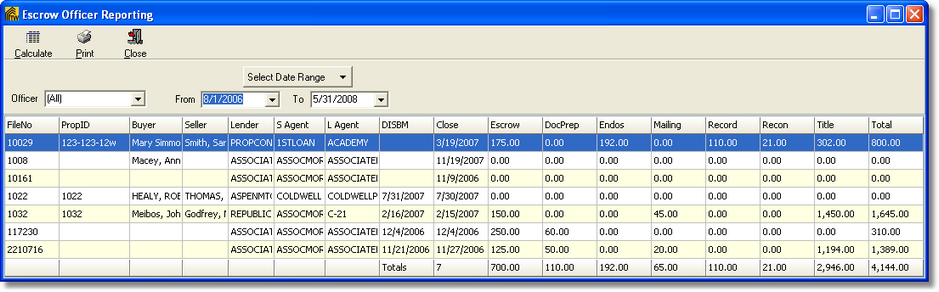
Escrow Officer Reporting will display the closings by the officer selected or show all officer's. You may also specify by date range. The report will list File No, PropID, Buyer, Seller, Lender, S Agent, L Agent etc. and may be printed when complete.
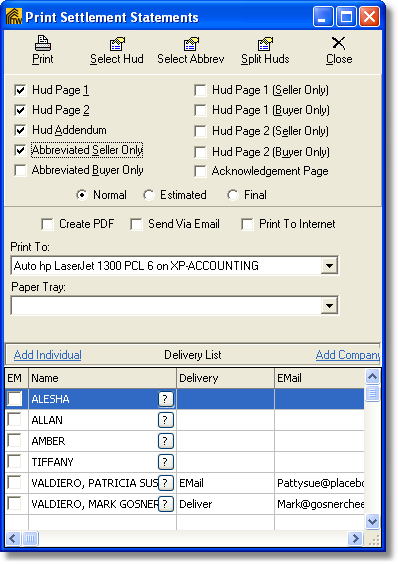
Printing Settlement Statements is done by selecting the Print Dialog button on the main Turbo Escrow screen. You have the option here to Select Hud, Select Abbreviated, and choose exactly what you would like printed. You also have the option to Create PDF file, Send Via Email, or Print to Internet. You may also set the status to Estimated Only.