|
Starting New Orders |
  
|
|
Starting New Orders |
|
Getting There
New orders can be started from the main menu by selecting => File | New Order or by using the F4 shortcut.
Description
Selecting New Order from the File menu or pressing F4 will allow the user to start a new order. When New Order is chosen the next sequential* file number is displayed in the New Order dialog box along with your chosen prefix and/or suffix. The Starting file number and default prefix and suffix are set on the Miscellaneous tab found on the Preferences screen. The current date and time are also automatically entered when New Order is chosen. The default department that a new order is placed in is "New Order".

NOTE:
* File Number sequencing is based on the number itself not taking into account prefixes or suffixes. For example, if file number 'A-1234 -W' was the last file number, then 'A-1235-W', 'A-1236-W' etc. would follow. If a numbering sequence is used such as 'A-1234-98', the next number would be 'A-1235-98'.
New Base Files
Getting There
A New Base File may be started from the main menu by selecting => File | New Base File.
Description
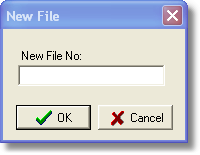
If a file number separate from your numbering sequence is desired, Turbo Title For Windows allows you to create that file number by creating a New Base File. By choosing New Base File from the File menu, a dialog box asking for your new file number comes up. In this box you can enter any sort of number you wish. The next file started will be based on your default numbering sequence and not on the new file number.