|
Order Tracking |
  
|
|
Order Tracking |
|
Getting There
Order Tracking can be selected by either choosing the Track Order option from File Menu, Clicking the Track Order button on the Main Screen, or by using the Ctrl+T shortcut.

Description
This option allows you to track the progress of a specific order. The information displayed on the tracking screen shows the flow of a particular file between departments. Department name, employee, time in/time out, total hours, and department code are all fields shown on this screen. If an order is in a department longer than the time specified in Department Setup the order and its information will be shown in red.

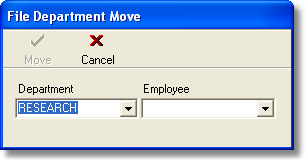
To move an order from one Department to another
| 1. | Choose the move button in the top left hand corner of the Department Flow screen. The File Department Move window will open. |
| 2. | Select the new department and employee. |
3. Press the Move button and then Close.