|
Directories |
  
|
|
Directories |
|
Getting There
Select Maintenance from the Main Menu, then select Preferences. From that window, select the "Directories" Tab.
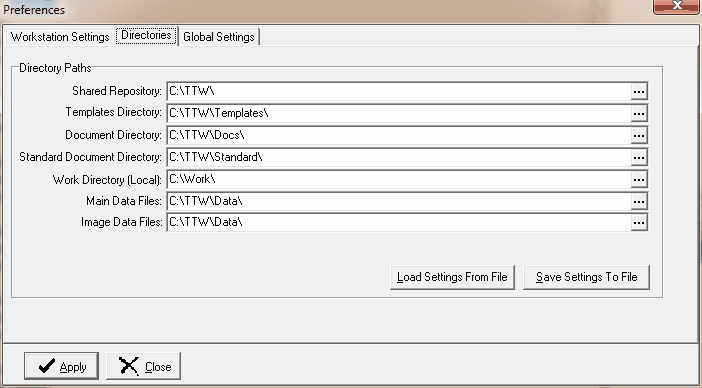
Directory Descriptions
Shared Repository: |
Usually points to the directory on the server where the TW.exe file resides. When Turbo Title starts on the workstation the date of the TW.exe is compared to the one in this directory. If the shared repository version is newer than the workstation version, the user is given an opportunity to update the workstation. NOTE: The user can be forced to update the workstation with a global setting. |
Templates Directory: |
Points to the document templates directory. Templates are Turbo Title master documents. |
Document Directory: |
This is where merged documents are stored and retrieved by default. Individual Order Number folders are created underneath this directory. |
Standard Docs Directory: |
Master Document Templates that are unlikely to be change the user and required by Turbo Title. |
Work Directory: |
Temporary Directory for internal usage. |
Data Directory: |
Where the data dictionaries and table are stored. |
Image Data Directory: |
Optional location for storing document image archives. |
Other directories that are created by Turbo Title underneath the Shared Repository directory:
Reports: |
Turbo Title system report definitions. |
Reports Custom: |
User created custom reports. |
PDF: |
PDF output directory. Individual Order Number folders are created underneath this directory. |
TIF: |
The TIF directory holds TIFF documents that are exported from Turbo Title scanned documents. Individual Order Number folders are created underneath this directory. |